
How Do I Restore ‘Sent’ EmailMessage Records With Attached Files?
In Salesforce, it is common to see attachments and files associated with EmailMessage records. The Salesforce API however has restrictions about linking ContentDocumentLink records to EmailMessage records over the API when the EmailMessage record status is not ‘Draft’ and produces an exception in this scenario. This information be found in the Salesforce Object Reference for EmailMessage here.
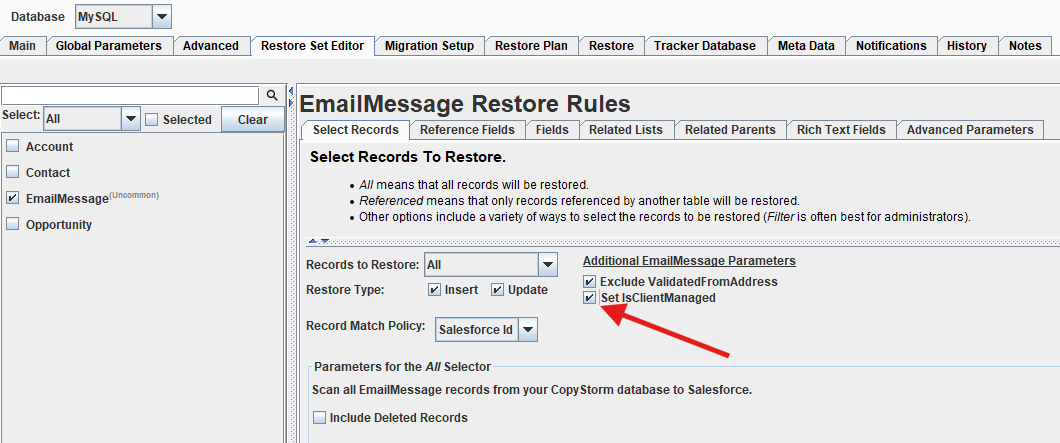
On the EmailMessage object however, there is a field called IsClientManaged that when true allows users to modify EmailMessage.ContentDocumentIds to link file attachments even when the Status of the EmailMessage is not set to ‘Draft’. As of the 10.64.3 GA release of CopyStorm/Restore, an additional parameter in the Restore Set Editor for EmailMessage can be selected to push EmailMessage records with IsClientManaged = true regardless of the value in the CopyStorm database.
How to Push EmailMessage Records with IsClientManaged = true
Follow the below steps to push EmailMessage records with the IsClientManaged field set to ‘true’ for all records:
- Open CopyStorm/Restore and navigate to the Restore Set Editor tab
- Click on EmailMessage in the lefthand list of objects
- In the Select Records section of the EmailMessage Restore Rules find the Additional EmailMessage Parameters section and check “Set IsClientManaged”