

Restore Wizard
Step 3: Scan Records
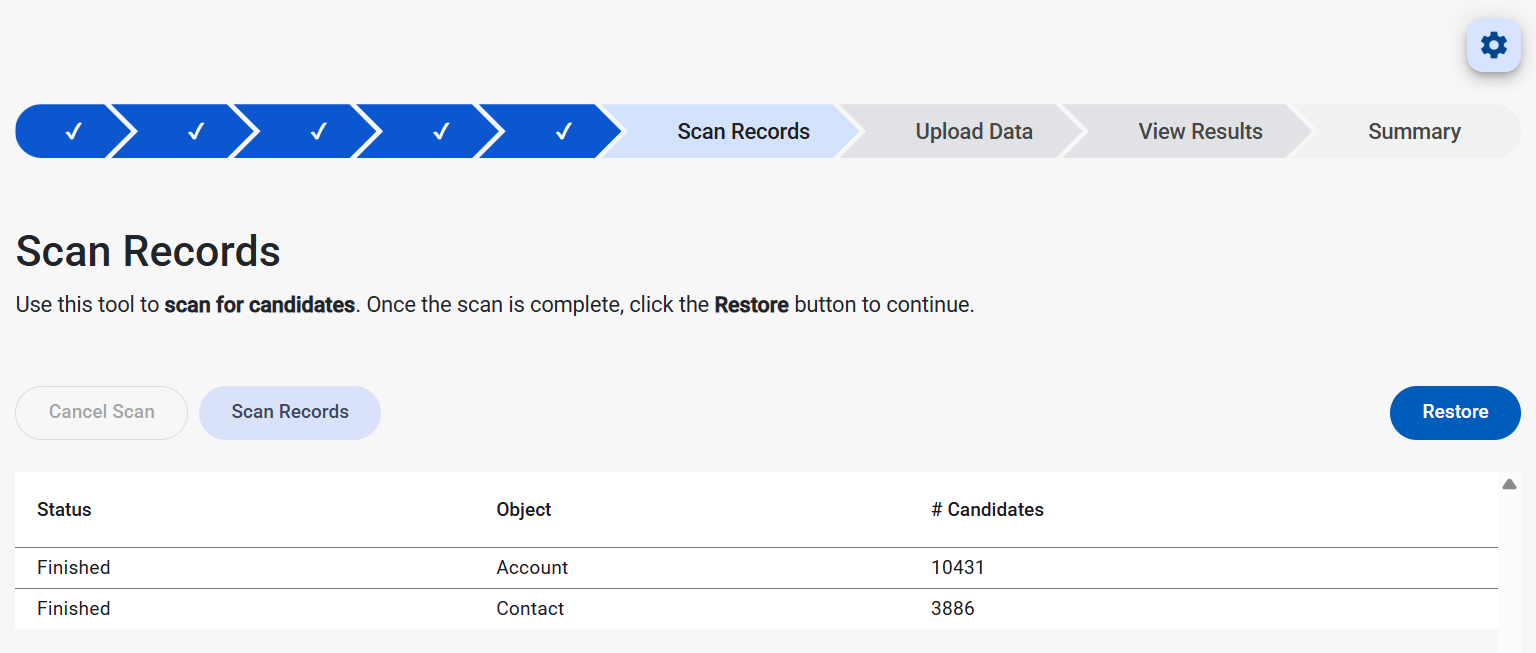
The Scan Records step of the Restore Wizard is a sanity check and planning stage. The wizard scans for what was configured included candidate top-level records, related child objects, and field settings. This process builds the full list of record candidates to insert and/or update in the target Salesforce org. Once the scan finishes, click the Restore button to begin the record upload process.
Purpose of the Scan Records Step
When clicking Scan Records, the Restore Wizard:
- Evaluates the selected top-level object records (from Step 1)
- Applies the Step 2 settings (Restore Type, Object Settings, Related List Depth, Automation)
- Determines which objects/records are in-scope and counts them as candidates
- Prepares the restore job so the next step can insert/update the data
Screen Layout
This stage shows:
- Scan Records button (starts the scan)
- Cancel Scan button (enabled while a scan is running to stop the scanning process)
- A grid with:
- Status – progress/state of scanning for the object
- Object – the Salesforce object being scanned (top-level and/or related objects)
- # Candidates – how many records were found that are eligible for restore
- Restore button (moves to the next step to begin upload of data)
How to Interpret “# Candidates”
A candidate is a record the restore job has identified as in-scope for restoration based on the selections and settings.
Candidate count is influenced by:
- Related List Depth (None vs 1/2/3 vs All vs Custom)
- Step 1 Filters
- How many related/child records exist in the backup
Common Issues/ Quick Fixes
No Candidates Found
- Navigate back to the first step in the Restore Wizard where the database and object are selected. Run the query and ensure that records appear in the righthand table.
- Confirm that Update Only on the configuration step is not selected when the target Salesforce org does not already contain the candidate records
Scan Process Taking a Long Time
- Long scan time is generally caused by deep relationship depth plus a high count of related data
- Cancel the scan, modify the filter for the top level into quantizable sections and perform multiple restores